
While waiting at not-so-Best Buy to have my hard drive backed up / wiped prior to sending my ASUS Brick Model off to be repaired, I took a little walk around the store just to look at my options should the laptop be “unrepairable” and ASUS refusing to replace it (I know, it shouldn’t be a problem to replace a piece of equipment that was purchased in January of this year, but it’s a fool who doesn’t make at least some contingencies in case of corporate bastardy).
All the laptops looked the same, had too many unnecessary features and cost too much, so I didn’t spend too much time there.
Then my eyes fell upon this creature:
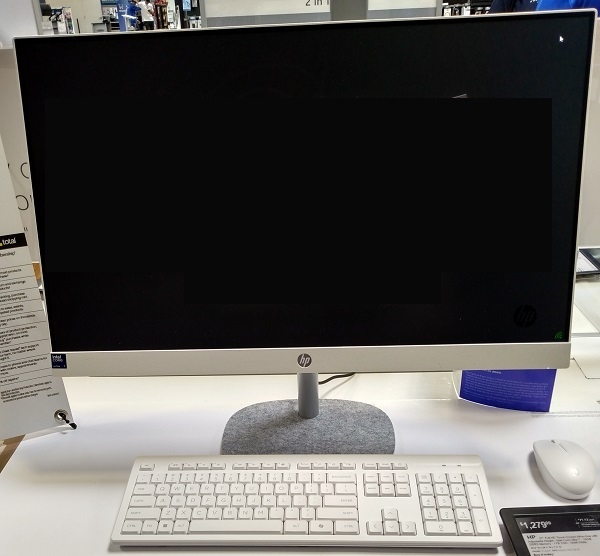
It’s one of those “everything in a screen” systems, and I must admit I was drawn to it — in no small measure because of the earlier suggestion from The Reader
While my need for portability has admittedly been reduced because I no longer travel as much as yore, I still might need to take a computer out of the house when going somewhere on vacation, for example — or needing to carry the thing out if there’s a fire in the apartment block. Carrying a PC tower and screen out is a non-starter for all sorts of reasons, but a single screen (plus keyboard) that in extremis could be carried in a large suitcase? That is a distinct possibility.
Here’s the White Monster’s spec sheet:
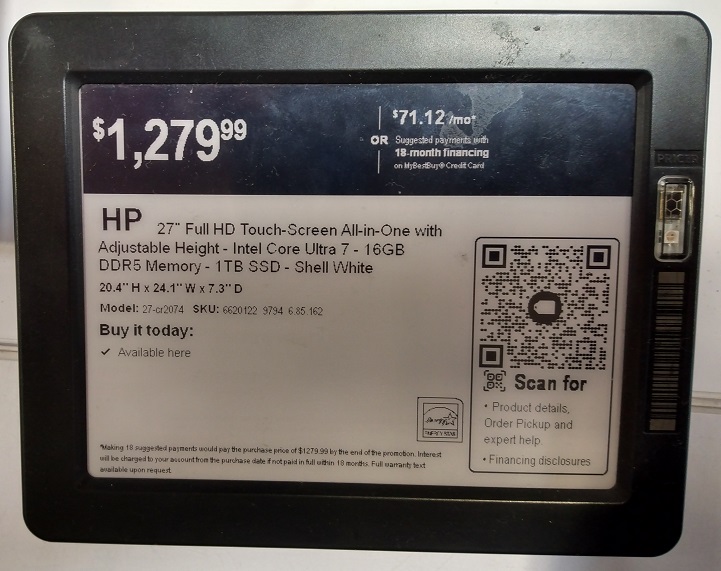
Hmmm. Big screen for my Aging & Failing Eyes, a properly-sized keyboard for my Fat & Fumbling Fingers, manageable size (see dimensions) and if I may be greedy for once, more computing power than I would ever need for the remainder of my existence on Planet Earth.
There’s the small matter of the dollars required, but I’d just raffle off a gun or two from my ever-dwindling stock of Second Amendment appliances.
If anyone’s had actual experience with one of these beasts, let me know in Comments, because right now it’s looking awfully attractive.
A couple of thoughts.
If the Geek Squad crew can’t powerup your Laptop they won’t be able to back it up and wipe it. Instead they will just have it sit on the shelf for two weeks and charge you for the “Diagnostic Fee”.
That HP systems is a step backwards. Some Marketing idiot told Engineering Just take all those leftover components from last year’s laptops and paste them into the back of all those small monitors we can’t give away. and you won’t have to do all that expensive portability and shock testing. We’ll have the Design Guys makeup a new clean looking bezel and a separate tray for those laptop keyboards to hide everything so it looks more like an Apple product _ Presto, —- We can sell a bunch of them.
The Engineering staff said OK = but you realize that you’ve just combined all the packaging disadvantages of a Laptop and removed the laptops advantage of Portability while adding more single points of Failure _ Right? They were apparently overruled once again.
Seems like a step backwards to me.
The point of going to a desktop is that you can add a nice 32 inch or bigger monitor for your eyes for little $ Touch screens are nice but you’ll find you actually don’t use the feature with a desktop so don’t pay extra for it.
In my previous post on the article initially talking about this I mentioned I am not a fan of all in ones. Regular desktop with a monitor you can change is the way to go. I myself run a Mac Mini M1. 4 years old, zero issues ever. Reliable. I use a Samsung monitor at the moment. 22 inch. Maybe someday ill get me a nice 27 inch. Size matters. I will not buy the iMac for that reason, I think the Mini is a fantastic machine.
You ask how will a backup occur if the machine does not power on? Likely, the hard drive in that laptop is going to either be an “NVME” or an “M2” type. It could be a 2.5 inch solid state, but if that laptop is very thin and light, i’m leaning towards the NVME or M2 type of drive.
As long as the drive is not soldered in (Some machines do this, like Apple machines), the drive can be removed from the laptop, put into an external reader adaptor and the data can be backed up.
True but I don’t have that much faith in the Geek squad’s ability, based on my experience. I would expect that level of knowledge from a ” Bob’s Local Laptop Repair Shop. “
I didn’t say I like geek squad myself nor did I say I have faith in them. I’m just stating that a backup of data can be done if a machine does not power on as long as the drive is not damaged. Also Kim may not have many options in his area or this may be where is he close to when he needs computer help. Computer repairs are not his specialty – writing the best blog on the web is his skill set. If I lived close to him I’d help him for free. If he ever needs advice from afar he can email me anytime as well. I usually don’t do any it work outside of work but some exceptions. Kim is the man.
Agree – the components are non-standard.
With a plain box and separate monitor, you can replace parts that fail for a lot less money.
Touchscreen on a desktop? Do you want to spend 3-4 hours/day with your arm hovering over the desk?
Get a basic box and a good clickey keyboard and ergonomic mouse. Check out those that are made for gamers – they are usually well made and very comfortable to use.
I’ve been using a Geekom MiniPC for a couple of years now. 5×5 footprint with all the power of a desktop. Just connect a monitor, mouse, etc.
This is the route I’ll be going when the current Win10 tower collapses. Get some of my desk real estate back.
In the current tower I don’t use the built in dvd player, but I do have an external one that I can connect thru USB if I want. I also have a USB hub for connecting multiple portable hard drives and SD card readers.
I have a couple of the minis on my amazon wish list for future reference.
I just looked at the prices of those Geekom mini PC’s, Those are PRICEY!
Also, how do you get service?
Not trying to sell Apple per se, however with the Mac products, I can call a 1 800 number if I need help, I can mail it out to Apple or I can take the item to one of their stores. Parts and service are readily available.
If you like Windows machines, Dell and Lenovo have machines that size as the geekom and again support, parts and service are readily available.
If you want a cheep small machine – check out the “raspberry pi”
raspberry pi is a cheap but usuble basic little machine. You can pick the kind of case / housing you want and you can run Windows or Linux on them.
For Linux, I don’t use Linux a lot these days, but Ubuntu or Mint are the distro’s I found to be the most user friendly.
I only had to use GeekOm’s support once, but it was fine. OTOH, my experience with Apple T/S was abysmal. Lots of “politically correct verbiage” but it took a week, literally, to arrange a repair.
The major advantage with Apple, if one goes the route of a Mac, is multiple ways to get support
If you call on the phone and get an unhelpful asshole, you can hang up and call back as with any company.
If calling back doesn’t work (you get another unhelpful asshole), you can bring your Apple product to the Apple store.
you can also login to your Apple account and setup a repair as well, and pick mail in or walk in.
It really gives the end user lots of options in case you hit the wall of a phone support person that is dumb or an asshole.
Does Geekom have stores?
How available are parts and replacements?
“I’ve been using a Geekom MiniPC for a couple of years now. 5×5 footprint with all the power of a desktop. Just connect a monitor, mouse, etc.”
Mac Mini and Lenovo Thinkcentre Mini are the same or similar size and cheaper. Also more available service and parts.
But if that machine works for you, then it is worth it.
Not something I would buy.
Cool. If you prefer FanBoyDom that’s fine. But I doubt that you’ll convince very many experienced folks that Apple is in any way an economical option.
“But I doubt that you’ll convince very many experienced folks that Apple is in any way an economical option.”
You are speaking from TRUE INexperience.
You really are showing some serious ignorance.
Mac mini, full price – $ 599 – On sale for $ 499 brand new best buy
M4 chip – 16GB Memory – 256GB SSD
GEEKOM IT12 Mini PC 12th Gen Intel® Core i7-1280P
i5-12450H – $649 – on sale for 429
Those are the least expensive options, both are within the same price range. You are not saving much money here.
– Now lets talk experience for the user – i have NEVER, and I mean ABSOLUTELY NEVER seen an update for Apple make a Mac blue screen or brick itself. Never. Not once. Apple controls the hardware and softrware – meaning everything is tested very well. I have seen tiny bugs, but nothing earth shattering.
With PC’s? A windows update goes out. 15 users show up complaining their VPN does not connect any longer. (I think we should tell these remote “working” cock suckers to show back up to work, but we don’t have time for rational solutions.). Turns out the version of the VPN installed does not get along with this week’s weekly Windows update. Have to uninstall the current VPN and go to an OLDER previous version. Another bug – machines start blue screening after a windows update, go to the update list, search through the KB123456 and use Google to see who else has seen this issue (because we are not the only ones). Find the offending specific update. Uninstall it on each machine it is on.
Do you even want me to get started on the One Drive bullshit? We are using that at work as a backup now, mainly because the network admin, who is an arrogent ass, decided that since we use microsoft and one drive backs up the desktop by default and most users are rock fucking stupid and have no fucking clue (or do not care to put the effort in to learn) where they save their files.
Then when the user hits save and can’t find something or their machine dies (software or hardware issue) that is my fault that they lost important data. Uh huh.
Microsoft is a needed evil for business as they have a few apps that might not be available on Mac (MS Access). but those apps are few and far between these days. Most things are web based.
And if you need a windows app, parralells lets you run Windows on the mac, far better than a PC running windows I might add, and you have 2 machines in one. YOu can even run linux on a mac too. Versatility is great.
Repairs – With apple, I can walk into a store to get repairs, or mail it out. I can talk to someone to get the repair arranged, on the phone, in person, or I can login to my apple account and do this myself.
On my two personal macs, the 2014 that I took out of service in 2021, and the 2021 model M1 – ZERO issues ever.
On my work fleet – broken screens. The screens are a little delicate on the laptops and imacs. That is it. And Apple made the repairs seamless.
Oh, and 3rd party. We did send a few macs out that were out of apple warranty to a 3rd party. The 3rd party repair was able to get parts and complete the repairs in under 2 weeks.
We have had out of warranty PC brand laptops that took over a month to get parts for, and cost as much or more than the macs to repair for accidental damage or out of warranty damage where the machine was still worth fixing, but it cost some money to fix.
Parts are readily available for Apple.
And most of all, Apple machines do not cost that much more than Windows based PC’s. I think you should do some research and have some real world experience ( I do this for a living) before you make statements that are just not true. You look ignorant giving advice when you don’t know what the fuck you are talking about.
This week at Best buy
Mac Mini base model – $ 499
Macbook Air M4 13 inch – $ 799
Macbook Air M4 15 inch – $ 999
Those prices are not huge crazy prices that cost way more than PC laptops or desktops.
Again, you just don’t know what the fuck you are talking about.
Now, a Mac might NOT be for Kim. I am telling him his options. If he picks a PC, I don’t care. If a PC works for him, GREAT! He should go that route. ANd if he does go the PC route, I personally recomend a desktop in Lenovo or Dell if you don’t often work mobile.
Some random no name PC? Yea, I don’t think so. A non propeller head like Kim is not going to have an easy go if there are issues.
“If you prefer FanBoyDom that’s fine”
I prefer using equipment that is quality and that works well with the least amount of issues and also it does NOT cost more than a comparible PC.
It is NOT about being a fanboy.
There are some Apple products I dislike.
Most work very well and are very fairly priced.
You parrot bullshit you hear or read from other ignorant fools on the web because you just don’t know what the fuck you are talking about.
By the way, I do this stuff for a living.
Expierence is a thing.
Now i am NOT a fan of all in ones. I like desktops with separate monitors. But just for comparison here
Kim had a price of $ 1279 for an HP all in one. intel i7. 16 gb of ram 1 tb ssd.
Regular price, no sale – just everyday price all in one from apple – 1299 for a comparable, yet in my opinion better machine.
The hard drive is smaller, that is it. HOWEVER, the screen quality is WAY fucking better on the apple. IPS display. Way more DPI. Screen blows the PC one out of the water. Since external drives and cloud storage are dirt cheap, i would go for the smaller hard drive but get the much much better screen oh and also more ram memory.
$ 1299
Apple – iMac 24-inch All-in-One – M4 chip – 8 Core CPU – 8 Core GPU – 16GB Memory – 256GB SSD – Silver
And you were parroting some bullshit you heard or read that Apple costs a lot more?
Do you know what you are talking about?
Whatchu been smokin dude?
Willpower my friend, willpower. Wait until the unit I mailed you arrives and you play with it a while.
Expected Delivery by
Saturday
23 August 2025 by
9:00pm
Your item arrived at our USPS facility in COPPELL TX DISTRIBUTION CENTER on August 22, 2025 at 3:14 am. The item is currently in transit to the destination.
Cheers
If you do join me in going the desktop route for your workstation, definitely check out either Samsung or Apple tablets for a portable solution on the go. You can get keyboards for them to type on as well.
Samsung and Apple Tablets might cost a few bucks more than the other names, but these two brands are reputable and usually work well. You can also easily find accessories for them (cases, screen protectors, keyboards etc) while they are new and for years after they are new as well.
Apple’s mobile iOS is EXCELLENT and easy to use and Samsung polishes the droid (android) os very well and customizes it in a way that it is very good as well.
I like the Apple products myself as I find their ecosystem to just work.
Windows is good for what it is in a way, but Windows is like a moving target – there are possibly millions of machines that Windows could run on, and so therefore 3rd party hardware will have driver issues, compatibility issues and other weird gremlins at times. Windows is great for work on domains and for many standard business apps – but at home I don’t have the time or patience for troubleshooting bullshit, so I use Apple at home. Snobby, but the shit works.
Apple controls both the hardware and software so that usually means a better and more seamless experience.
To the person above asking how will a backup occur if the machine does not power on? Likely, the hard drive in that laptop is going to either be an “NVME” or an “M2” type. It could be a 2.5 inch solid state, but if that laptop is very thin and light, i’m leaning towards the NVME or M2 type of drive.
As long as the drive is not soldered in (Some machines do this, like Apple machines), the drive can be removed from the laptop, put into an external reader adaptor and the data can be backup up.
I am guessing that the actual issue could be one of a few things with the laptop
– Updates are needed for the BIOS, Chipset etc – I have seen this with Lenovo machines. The laptop does not charge with the power adaptor it came with and will also not charge with 3rd party power options like docking stations. Running Lenovo Think Vantage System Updates gets these back up and charging. NOW – rule of thumb is to NEVER run a BIOS or CHIPSET update when NOT plugged into power, as if the machine powers off during one of these updates, the machine is now a paperweight and will need to be sent out to the manufacturer or a 3rd party that handles similar to factory repairs for service.
(ON a desktop machine – a motherboard could be changed out on a non proprietary machine). On a laptop – usually those boards are specific to that model and need to come from the manufacturer.
Anyways – due to the machine not being able to charge, I run these updates for BIOS and CHIPSET with the battery as I have no choice, and they will get the charging working again, my rule of thumb is 50 percent or more battery. If less than 50 percent of battery, I will do a donor battery transplanted from another of the same model (at work I have 50 of each type of model easily, so I can charge a working one up and then swap the battery out).
Side note – I can’t tell you how many rock fucking stupid users show up with a battery at 3 percent saying hey it won’t charge. Im like, oh terrific. You waited until it was almost dead to show up and tell us about this issue and you want instant attention right now? Well I was working from home they say. Fucking useless idiots, but that is a side issue for another discussion.
– Another issue could be that the power charger is bad, but likely you don’t have another power charger to try out as you are one user with one machine.
or
– The charging port itself on the motherboard of the laptop is bad.
I hope you get this sorted soon. It is frustrating as hell to need something that you rely on for work, or even for personal enjoyment and the equipment breaks or malfunctions and you yourself don’t have the means to fix it and you are at the mercy of others to help in a post covid world where not many places or people are as helpful as before 2020.
On the all in ones, Desktops are great, but I would suggest, again do what is right for you, but I suggest a desktop that has a separate monitor. That way if the monitor dies, cracks, malfunctions, fails in some way or you later just want a bigger larger monitor, you can always change it out with a regular desktop. All in ones you are sort of stuck with what you have. Yes you can run a 2nd monitor on most modern machines, but the main monitor will always be the same for the entire ownership of the machine on an all in one.
Good luck and keep us all posted on what happens.
I’ve used an all in one computer, worked great. I’ve had several HP computers with no issues. Purchased their 17 inch variety laptop this summer, in large part because I’ve been using HP products since 1974 (HP-45; HP 15; HP-48GX; HP-35 and HP12c) They are my go to calculators, or have been. The only issue I have and you might have with the company is their anti-2A stance over the years. I don’t know what their current CEO is doing. But, dang, their products are just too good compared to Casio and Texas Instruments that I have to overlook that aspect in order to have the best calculators and pretty dang too computers. I’ve three of them over the years and am using their tower and monitor as I write this. Hope this helps.
Most all of big tech is anti 2A. Just gotta forget that part and pick the most reliable brand in your budget that does what you need and want.
I have never personally found any tech company that was pro 2A. Most people who work in tech are mindless drones who get excited over expensive electronic gizmos that are sold as making your life easier and better but in some cases the technology makes life more miserable and frustrating and let’s big brother govt track you more easily.
I’m about doing things that make sense. If tech does something to make your life easier use it. If it sucks don’t use it even if many others are.
Side note – all this tech embedded in vehicles since 2020 is stupid as fuck. Doesn’t make life better and there are just as many if not more accidents and breakdowns of vehicles with all this fucking horseshit in modern vehicles. Also more expensive to work on and less people who can work on it.
“But, dang, their products are just too good compared to Casio and Texas Instruments that I have to overlook that aspect in order to have the best calculators and pretty dang too computers.”
Quality is one piece of what I call the 3 piece puzzle when buying something
1 – Has to be in my budget range – i sometimes use the buy once cry once method and go just above my budget but has to fall in this range or close – Example, Milwaukee power tools are the way to go, and far 2nd place dewalt. I have some kobalt junk and when that stuff dies (as a few have) I will NEVER buy kobalt again.
2 – Has to be quality like you said
3 – overall, in addition to qaulity and price I need to be dealing with a reasonable company. ANYTHING can break. Toyota vehicles. Ruger guns. ANYTHING. Even the best companies have things that have issues. The MAIN and BIGGEST question is, CAN THIS COMPANY SERVICE THE PRODUCT IN A REASONABLE AMOUNT OF TIME AND WILL THEY TREAT ME RIGHT AND GET THE PRODUCT FIXED.
You can have the best item in the world, but the company is waiting for 3 months on parts or has you sit on the phone through 57 different options before you talk to a live human who transfers you around to 3 different people before they hang up on you, and then when you get someone who “helps” they need your purchase receipt, have to know how you used the product, what you date of birth and height and weight are, where you live, and then and only then they tell you to try 14 different steps and then call back if there is still a problem. That kind of treatment exists and your time is worth something.
I can say that while Lenovo, Dell and Apple are not perfect, and likely they are anti gun, and they all get parts or initial builds done in China – they can take care of their customers in a reasonable amount of time and treat you right for the most part.
Other names, well, it is like rolling the dice. Might work for a little while, but who knows how long.
Example, I can’t stand Amazon for many reasons, but I use their firestick devices for the few times I watch TV. They work generally well, and if I need help, they are a 1800 number away and can replace the device with another one if mine ever died or had major issues.
Can you say that about the generic streaming device on the wally world shelf that is 5 bucks cheaper?
HP is hit or miss for me on support…
Even though I started computers using a DOS prompt 4+ decades ago, I’m hardly any sort of expert on the new stuff. What I will say, however, is that I now view laptops as expendable commodity items. Buy cheap, buy often. Budget accordingly. Don’t spend a penny more than what you need for bare basics. And don’t start thinking “this will be the last computer I’ll ever need to buy”. Guaranteed that will bite you in the ass.
There are multiple laptops available on Amazon for under $400, some under $300, that will allow for basic internet crawling, word and spreadsheet use, and various other office type tasks. That — thing — you pictured above costs about 4 lower end commodity laptops. And as mentioned above, all the disadvantages of a laptop with none of the benefits.
Also, FUCK HP. The last HP printer I owned got chopped up with an axe cause it sucked so bad. I refuse to use any HP product after all the “printer not available” bullshit I had to suffer thru. FUCK HP.
HP printers from the past were great. Post 2020 many things seem to be throw away junk.
At work there is Canon and HP.
At home for 15 years I have used Brother brand.
My current Brother printer is a black and white laser that is like 13 years old.
The network card on it died a few years ago but I have a shitload of toner for it.
So I use a long as USB cable I bought off of amazon that was imported from China when I want to print.
It works.
> Also, FUCK HP. The last HP printer I owned got chopped up with an axe cause it sucked so bad. I refuse to use any HP product after all the “printer not available” bullshit I had to suffer thru. FUCK HP.
Agreed. I do have a LaserJet 1320 at home that still runs like a champ after the better part of 20 years with only the occasional new toner cartridge, but that’s from well before the company’s ongoing enshittification. I wouldn’t recommend their current printer lineup, and I’m skeptical about their consumer-grade computer lineup.
Then again, I’d give the side-eye to almost any company’s consumer-grade computers. I build my own desktops and servers from parts. For portability, I haul around a Framework 13 that’s almost as easy to upgrade or fix as a desktop:
https://frame.work/
Before that. I was using a Dell Latitude 7370. It’s a bit long in the tooth for everyday use, but it works well enough in the kitchen to look up recipes.
Also, just food for thought, With a PC – you can Run Windows for Linux. Never Mac OS (without hacks of course, but that is another topic).
If you get an Apple machine – you can run both Mac OS and Windows (Parallels Desktop for Mac is fairly priced and works very well). A windows license runs about $ 139 for the home edition one time and Parallels Desktop for Mac is about 100 a year.
So for 240 bucks added onto the price of any Mac, you will have a machine that runs BOTH Windows and Mac OS. You can also even make it a 3 way, and run Linux too if you wanted.
– You can use any brand keyboard with a Mac, I use Logitech keyboards and mice. My favorite brand and I think they are the very best. Lots of sizes, configurations and colors in Logitech’s portfolio.
Just another option.
Oh – and Applecare support is a must for Mac’s Brings the warranty and phone support to 3 years.
Apple reps are actually helpful.
I don’t say this to be racist, but when you call Lenovo or Dell sometimes you get someone you can understand, but sometimes you get an indian who not only can you not understand, but they have no fucking clue in the slightest what they are doing or talking about.
I bought and replaced two Logitech Bluetooth keyboards this year. Both got stuck keys within a couple of months. Different keys, so it wasn’t one particular key’s problem. The second time I replaced the POS Logitech with a HyperX cord-connected keyboard. The Orifice Depot salesman told me it was “fast” because it is for gamers. I’m not a gamer but I agree that its response is faster than the Bluetooth keyboards, and it was $65, only $5 more than the Logitech failures.
Keyboards are like tires. They are a wear item. Type a moderate amount and the texture in the keys becomes smooth. Some of the letters labels can wear off.
Type a lot or heavy handed and the springs can wear.
Dust and dirt get in them.
I always keep an extra keyboard new on box on hand. Mouse too. When they are on sale or when I toss a beat up one away I buy another to have as a spare.
Like I said I view these keyboards as a wear item like tires on a car.
I like Logitech. Some other people like Microsoft. Some people like the game ones.
Do you want all season tires? Snow tires? Low profile? All terrain?
Do you want a mechanical (aka clicky) keyboard? A chiclet style? With it without a number pad? USB dongle wireless, Bluetooth or wired? For wireless do you want rechargeable built in batteries or replacement with the bunnies batteries so that the batteries match the kind on hand for other items in your home (tv remotes, wireless cameras, electric tooth brush, dildos etc).
It’s all preferance.
I have no arguments with what you just wrote. I used Logitech keyboards for several years. That’s why I bought a new one this January. This year, the quality of their keyboards, at least the Bluetooth model, seems to have taken a dive, so I’m warning Kim.
NO NO NO!
A big red flag is that they don’t put the monitor specs up front. I had to dig around on the BB website to find that the touchscreen monitor is only 1920 x 1080, which is woefully pathetic. My iPhone 16 Pro Max has 2868 x 1320 for comparison on a 7″ screen, not even close to a 27″ computer screen. My current 32″ windows PC monitor runs at double that (3840 x 2160) and it’s over 5 years old.
Please don’t fall prey to the temptation.
I’m still rocking an iPhone 11. Has 64 GB. It’s 4 and a half years old. Still works. The last 4G phone Apple made. 88 percent battery capacity after 4 and a half years.
I need to get a new one at some point. Definitely getting another iPhone when I do replace whenever that time comes.
Those all-in-one systems are the devil and should be avoided. Even the Apple ones. If you’re going for a desktop, I do recommend the NUC / uSFF boxes. They’re quiet and take up very little space. Intel NUC Pros are the preferred brand, though IIRC Asus took over that arm. Then add a business 32″ 4k monitor like the Lenovo L32p and set Windows scaling to something like 150% to get lovely clear text that isn’t too small to read.
Don’t get one of the basic laptops. They suck (slow, poor build quality, prone to failure) and you’ll spend more in the long run.
I stated that. Both in this blog post today and the previous one. A desktop is best and that all in ones are not a good idea.
Apple all in ones suck too. I did say that I use a mini. A mini is not an all in one.
“NUC / uSFF boxes”
Kim is not a computer guy. Where does he get support with this brand?
If you stick to HP, Dell, Lenovo or Apple those are known quantities. Geek squad will likely not work on one of those little boxes. And if they will can they get parts? And those cost as much or more than known brands.
That whole thing seems throw away. If your going that route the raspberry pi is much cheaper in case you have to toss it when it breaks.
Agree on cheaper laptops. Chromebook’s and laptops under 600 tend to be cheap and shitty
If you do want a laptop – Lenovo think pass and Apple MacBooks can be had starting around 700 bucks and these are high quality machines. The Apple screens are a little delicate on their laptops to note though.
I prefer a desktop overall myself. When I am on the go I use my iPhone for mobile shit. Fits in my pocket has excellent battery life and does everything I need it to do. Calls. Texts. Browse the web. Order food on apps. And comment on the best blog on the web – this website
For the most part, I agree with Teetotaler – The Artist Formerly Known As CoffeeMan, who has saved me a ton of typing.
What he said.
Your laptop should be back in time, one would hope.
Far as your old eyes and fat fingers (my problem also), you can get a decent 24″ monitor for around $100, a keyboard mouse set for $30 or so. Just plug them into the laptop.
Want a desktop, look at a NUC. It’s a windows version of a Mac Mini, they go from $150-$800 or so. An all-in-one is pretty much the same architecture as a laptop. At least the laptop will work in a power failure.
“At least the laptop will work in a power failure.”
Not too nitpick or argue, but you are missing some fine details with that statement.
– Power goes out. Your laptop stays on. IF the battery is charged. And only for so long… (8 hour battery life on a laptop is like saying a car gets 35 miles per gallon. That is with one driver, no air conditioning on a flat surface dyno test usually).
If you use your laptop with the brightness even halfway up, or have sound playing out of the speakers, or if you plug in a USB drive etc anything that uses power, theres NO way the “all day battery” advertised is actually going to last all day.
So you have a LIMITED time on that battery of your laptop in a power outage.
– POWER GOES OUT – Does your internet stay up? If not, are you just doing stuff OFFline?
I have a portable generator for emergencies. I can keep a window AC going to keep one room cool in hot weather in new england (summers are hot and muggy here) and the room ac becuase running a whole house mini split would need 8,000 or more watts. I have a tiny Honda generator. I can run the window AC in the summer in a power outage, along with some tv , internet and a few lights. In the winter, I can run the furnace (oil furnace, uses like 300 watts once running, 1200 max to start) , hot water (indirect hot water heater, NOT electric) so I have heat and hot water in a winter storm. TV and internet stays on as well on the generator.
Without a generator, you either don’t have internet or you need to look for a small battery powered power station. I am not the biggest fan of battery powered power stations, as I think gas generators are way way better (gas can be refilled in minutes, how do you recharge a power station during a long prolonged power outage? You could use the solar panel method but even if there is tons of sun it takes some time to recharge. Hurricane or winter snow ice storm you can forget that method as well).
People in apartments might need to go the route of the battery powered power station, and some of them are ok, but they are heavy and pricey, especially the larger ones. But they are on option.
ANd if you have either a generator or a battery power station you can still use your desktop.
If you have a laptop – but h for someave no generator and no power station, your laptop will stay powered on for some period of time, but you will have no internet.
Now, some will say , oh I will use the hotspot on my cell phone. Yes you could do that. And that will drain the battery on your cell phone too. But that is an option.
Anyways, my point here is, a laptop alone doesn’t mean dick shit during a power outage. There is more to keep working during any outage.
Be prepared always. A laptop battery alone is NOT being prepared.
“Far as your old eyes and fat fingers (my problem also), you can get a decent 24″ monitor for around $100, a keyboard mouse set for $30 or so. Just plug them into the laptop.”
While Kim could do this now that he already owns a laptop, and this is helpful to him, the point I am making is before someone buys a laptop for a main work station is to consider that for the same or less money as a laptop, you can get a much more powerful desktop.
Then for portable use, have a tablet or a phone.
How much work is someone doing on the go anyways? For the few times you need it to be mobile, the tablet or phone will do what you need, and you have that as a backup if the desktop goes down.
Most people using laptops tend to sit at their desk in their house or at work…
Some of the hippies are at Moon Dollars over priced coffee joint saying ohh this 7 dollar iced coffee that I left a 3 dollar tip on tastes fucking really good its organic and I have my laptop here with me posting bullshit on the instant graham while I sip this overpriced diabetes in a cup.
As someone that used to do PC tech support and repair in a previous life, I absolutely despise the all in one units with flaming passion.
As state above all the disadvantages of a laptop (inaccessible components crammed into small space with minimal or no airflow for cooling ) with the disadvantages of a PC concerning portability.
Not recommended, especially at that price point.
The MicroCenter tower I purchase a couple of months ago was just over half that price, and even had I needed to purchase a monitor (I already had the 3 I’m using) it still would have been cheaper with comparable specs and more upgradeability and easier repairability.
Build it yourself computers or computers from a place like microcenter (kit pc’s and pre built clones) are great for the do it yourselfer or enthusiast.
Kim is not a propeller head. So. While if a component dies he can get a replacement of off the shelf parts for a kit pc , what if he doesn’t know what component is bad? What if he knows but doesn’t know how to change it? (Motherboard dies you have to unscrew the video card if it’s not onboard the motherboard, remove cables. Unscrew the board – put the new one in the computer, hook up the front panel buttons via the wires which is a fucking pain in the ass etc. oh put the heat sink and fan back on the cpu. Thermal paste before you do. Those clamps on the heat sink can be tight as fuck.
Anyways. Known quantities. Kim is not a propeller head. He is an operator. He wants the pc to boot up and do what he needs. The known quantities of Lenovo dell Apple etc will let him work. And if it doesn’t work. He calls the chief Indian in the phone and says this shits broken am I bringing it to a shipping place or can you fix this over the phone. Warranty and component work replacements etc are someone else’s problem not Kim’s.
With build it yourself rigs or rigs that are build it yourself by someone else they don’t offer that same support for the most part. Great for nerds. Not so much for regular users.
Last pc I built was in 2012. In 2014 I got my first Mac mini. Then in 21 I got an M1 Mac mini.
When I get home after listening to rock fucking stupid lazy as fuck dumbass pieces of shit complain about their computers the last thing I want to do is work on my computer to fix any issues. I just want to watch YouTube, listen to music or read this blog and send emails.
Also I think Kim is more of a windows user but I prefer mac at home because I’ve never ever not even a single time seen an update on a Mac cause a blue screen or have the mac get bricked.
Blue screens and brick machines are less prone today than windows 98 XP 7 etc but they still happen.
Mac updates just work.
Pc updates are a needed evil but sometimes it’s like rolling the dice.
Oh and as mentioned above as I said with a mac you can also run windows. Both on one machine Mac OS and windows.
With a pc you can only run windows. Unless you build a hackintosh. I’m not going to explain that here let’s just say that’s a very involved do it yourself thing and not on any way supported by Apple.
One more add – Linux you can run on either pc or mac. Many people do not use Linux mainstream as much as windows or mac but Linux is a good os. Ubuntu and Mint are the distros I recommend if you want to run Linux.
Many people run a variation of Linux on cell phones. Samsung and google pixel and many other phones use the android or droid os. That os is based on Linux. Chromebooks are based on that as well. Google even lets you run chrome os on clone machines. Download chrome flex os It’s a simple but easy to use os. Takes some small steps / work to install.
My MicroCenter unit is an Acer that came off the shelf, complete and ready to run out of the box. No build it yourself. And it was cheaper for my needs than buying the pieces parts to build (which I could have easily done. But I hear you about not wanting to mess with it anymore after years working in the field at various levels)
The only thing I did was pull the SDDs out of the old PC and throw them into the new box for quick data (non-OS) transfer and more storage space. But it was perfectly useable right out of the box, perfect for a “non-propeller head”.
(I have a couple of those in my VFW Post Leadership and I try to make it as non-techie as possible for them to use the new machines we purchased recently.)
I put my wife’s Lenovo all in one in the recycle bin Monday. It was still running, stuck on Windows 10 and it couldn’t handle the newer codecs for her TV shows of foreign origin and dubious legality. (However the wireless keyboard is still great.) Now she has a 42 inch Sony TV, and a home built PC with a 4 TB SSD so she can watch away. Small monitor and one of those cheap minis are the way to go.
Pick up an Amazon Firestick. Not the box, one of the sticks. Either the 4K or 4K max. Full price about 50 or 60 bucks but they run sales all the time.
Roku and Apple TV might be a little nicer quality of a remote and a little smoother interface – and I also think Amazon is at times Scam a zon, but their fire sticks are nice
– User replaceable batteries in the remote
– Ability to side load apps (not just apps from their official App Store)
– You can run a VPN on them ( “TV shows of foreign origin and dubious legality”)
– Lots of free channels and movies already built in.
This will supplement your PC connected to the TV.
Many times you can get these on sale on prime day and Black Friday, and many other times of the year for 30 to 50 percent off.
It will connect to the HDMI port on the tv, likely of which there will be at least 2 or 3 on most semi modern and modern tv’s.
And see – I don’t just blindly say apple stuff for everything for the poster who suggested that above…
“4 TB SSD”
Size matters. Yours is way bigger than mine…