As someone who is actively looking to do this, can someone please explain the last panel to me?
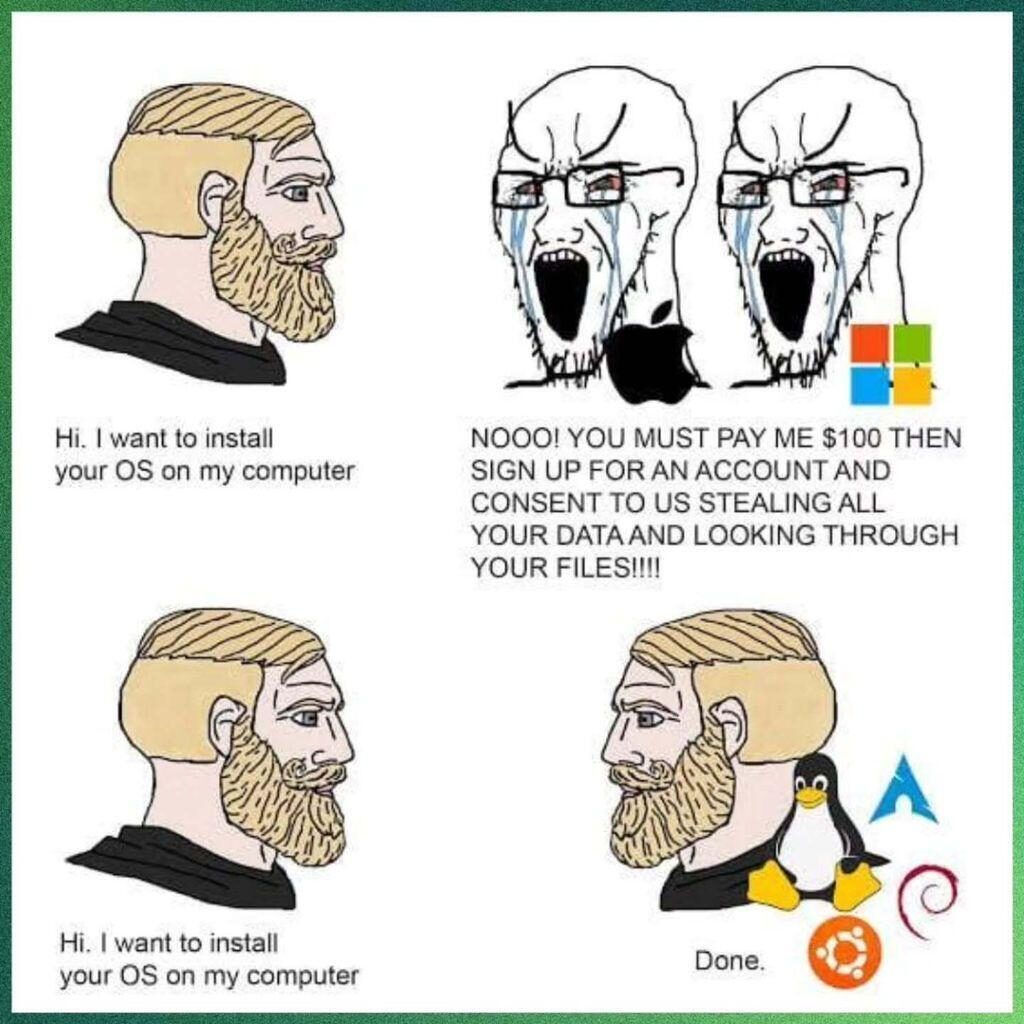
…because I don’t understand the iconography. What are the products?
#StupidOldFart #OutOfTouch

As someone who is actively looking to do this, can someone please explain the last panel to me?
…because I don’t understand the iconography. What are the products?
#StupidOldFart #OutOfTouch
Comments are closed.
Top one is Microsoft. Bottom one is Linux.
The two top figures represent macOS and Windows.
The bottom figure represents Linux. The cartoon penguin represents Linux itself (it’s “Tux,” the Linux mascot), while the other three icons represent specific “distributions” of Linux: the blue triangular shape is Arch Linux, the spiral is Debian GNU/Linux, and the orange circle is Ubuntu Linux.
The point here is that both macOS and Windows cost money, require signing up for an online account (Apple ID or Microsoft ID), and violate your privacy in various ways. Linux does none of these.
As two others have said, the bottom logo’s are Linux os symbols.
The penguin is the mascot tux
Linux is open source. Lots of different versions available and most are free with the exception of a few.
The different versions, usually made by different companies are referred to as “distributions” or “distros”
If you try Linux, the best versions in my option are
– Ubuntu
And
– Mint
Also the top isn’t too accurate.
Apple doesn’t sell their OS separately from hardware for any cost.
You by a machine from Apple and Apples OS comes on it.
Now there are people who get a copy offline and load Mac OS onto an ibm clone – aka a hackintosh – but that is a hack thing. Not an official thing
As a side note – Linux is great but I prefer Mac myself.
That being said. I bought a new iPhone this past week, had a 5 year old one.
The Apple Store overcharged me 30 bucks and no I did not notice until I got home.
Needless to say Apple corporate is a bunch of total fucking assholes who said the only way I cold get the money overcharged back is to revisit the store. They wouldn’t do anything for me over the phone.
Andy at Apple corporate – you sir are a fucking asshole.
1. The Hackintosh thing is effectively over. Apple moved on from the Intel chips a couple years ago, and it’s *really* hard to get Linux to run well on Macs made since at least 2020. Apple uses (off the top of my head) wifi and some other chips that Linux doesn’t support out of the box.
2. Apple might not charge you for the OS, but the cost is sort of baked in (just like Windows isn’t a separate line item on mass market computers). And they do insist on being able to look through all your files.
I understand fully about the M series Apple processors and running other OS other than MAC OS on a Mac.
Windows can run virtualized or you can get an ARM version. (Paralells or Virtual Box for example).
There are ARM versions of linux as well.
As I said “Now there are people who get a copy offline and load Mac OS onto an ibm clone – aka a hackintosh – but that is a hack thing. Not an official thing”
NOT an official thing. Some people run this in a virtual machine – like virtual box, but again, it is a hack , not official.
Windows licenses might be “baked into” the price of a PC – but trust me – HP, Dell and other name brands ARE working Windows into the price.
For example, I run the Mac Mini as I hate all in one machines. I can bring my own monitor keyboard and mouse. THe base mini is 599 and comes with an M series processor that is comparable if not faster than many Intel and AMD processors. Base Mac mini in 2026 has 16 gb of ram and you can get more. For 599 to come with a solid machine that work and has an OS that works well – many budget IBM clones do not have that level of reliability and usability. Maybe you get a little more hardware, but does that hardware work well? Without having to fuck with it?
I have seen Windows machines working amazing until… A nice Windows update. With Windows, you are just one update away from major changes you do not like or a fuckup like a never ending blue screen or no longer working hardware.
With Mac, you never have to worry about updates not working and you don’t have to fuck around with drivers if you move from Windows 10 to Windows 11, on a Windows machine (IBM Clone) I have seen where an machine upgrades from Win 10 to Win 11 – but the sound is broken or the video drives are all fucked up. THe machine is less usable if usable at all. Sure it is compatible with 11 but does it work right at all even with having to troubleshoot shit. And if you call HP or Dell and the machine came with 10, they may or may not support you.
Apple on the other hand, if the machine is a supported machine, it will run the newest OS. I have seen Apple hardware supported for 8 to 10 years from release.
Also – I have NEVER had to enter a product key or activate an OS license.
AND
I have NEVER had a Mac fully lock up – I have seen apps (programs) lock up once in a great while but I have NEVER and I mean truly NEVER seen a Mac that has locked up completely. It could happen and I am sure it has here and there, but it is more rare than getting struck in the ass by lightning.
Linux is like Windows just without the product activation, and while it is a little more stable, sometimes you still have to fuck around with drivers.
Again, buy what you like – all I know is after a long day of supporting tons of Windows based devices, and some Macs as well – I come home to a Mac.
And I use an iPhone.
I am NOT an elitist or a Snob, I just don’t want to fuck around with drivers and configuring shit when I get out of work.
YMMV
PS – Apple Corporate is mostly a bunch of elitist assholes. And sometimes their prices SEEM high, but they have shit that works.
And – Apple really is not that expensive when it comes to phones and computers if you compare apples to apples (Pun NOT intended).
For accessories, I agree the headphones and other stuff can be pricey. I use logitech keyboards and Mice with my mac mini and a samsung monitor. But even if you buy apple brand stuff, again, it just works.
Oh and never had to load a driver for any of my non apple brand accessories like keyboards and mice and speakers when using them with a Mac, unlike Windows.
Windows sucks fucking balls.
As you see, if you want to escape, your best bet is Linux. That puts you in a different kind of thicket.
Your options are:
1. Linux can coexist with Windows, so you have to swap between them according to need – a PITA if all you want is to do stuff.
2. Stay on Windows and suffer.
3. Go Linux ( where you get to “choose” (or have chosen for you) one of the varieties such as Ubuntu (sound familiar?) Debian (the base system for Apple systems), Red Hat etc.
If you go ALL linux, you will either have an unfamiliar and impoverished Graphical User Interface (GUI) or have to learn the arcana of the Command Line Language (CLI).
Unless I have misunderstood you completely after all the years of reading your blog, I think all these options are likely to be bad for your blood pressure.
Related to this kind of platforming issue, I am working to make myself independent of client-server systems that require me to host stuff where service can be cut on the whim of some third party. I am happy to share that with you and your readers if wanted.
“3. Go Linux ( where you get to “choose” (or have chosen for you) one of the varieties such as Ubuntu (sound familiar?) Debian (the base system for Apple systems), Red Hat etc.”
NO – WRONG – MAC OS is NOT based on linux.
MAC OS as we know it today (Versions 10 and above) are loosely based on BSD Unix which was a framework / piece of the puzzle for NeXTSTEP which was the OS – and the company was named NeXT – a company Steve Jobs founded – and later brought the technology to Apple when he returned to Apple.
BSD and linux are both based on unix at the core so to speak, however BSD is very different than linux distros. And MAC OS is not solely based on BSD either.
So many people wrongly say that MAC OS is based on Linux. This information you and others peddle is simply incorrect.
When you compare Mac OS to Windows, the usability is not even close. Windows is a good OS – gets most things done. Updates are fucking sloppy as hell in Windows and becuase of the amount of hardware Windows can run on, blue screens happen, and there are many hardware and software issues that simply do not happen on Apple machines.
Linux is great if it does what you need.
It all boils down to what the users needs and how they like the OS.
I think Windows works great for me at work because it has what I need at work. There are Mac’s where I work as well.
At home, I do not want to spend time installing and configuring shit after doing that all day, all while supporting lazy and rock fucking stupid users and their even dumber managers and execs who were promoted under the whole FUCK UP MOVE UP peter principle system, either than or favoritism / nepotism.
Most people can barely fucking use a computer, the majority of people i see can barely login to a computer or their email. Most should be fired for total incompetence. But that does not happen likely because of who the stupid fucktards know or blow or both.
Back to the OS – use what works for you.
Just remember to have correct info.
A quote from the distanct past (1996 or 97 IIRC):
“””
The difference is that Unix has had thirty years of technical types demanding basic functionality of it. And the Macintosh has had fifteen years of interface fascist users shaping its progress. Windows has the hairpin turns of the Microsoft marketing machine and that’s all.
“””
This is, largely, still true.
I do Linux for a living (or did, currently OOW), and have made my living based on knowing it well since basically 1999 (I was using it for a while before that, but wasn’t getting paid full time for it until then).
“””
unfamiliar and impoverished Graphical User Interface (GUI) or have to learn the arcana of the Command Line Language (CLI).
“””
While the GUI isn’t as integrated and consistent as MacOS (what I’m tying this on now), it is not “impoverished”, it is *inconsistent*. There are really stupid reasons why this IS, but once one settles on a distribution–especially Ubuntu or RedHat–it’s going to be at least as consistent as Windows. Which isn’t saying much.
And unless you want to do more complicated things than the various utilities allow, you really don’t need to get to the CLI these days. Yeah, if you want to copy all the mpg files in a directory that start with “a” and are more than 45 days old you can `find ./ -name “[aA]*mp4” -mtime +45 -exec cp {} /to/new/path \;`, but doing that in Windows is at least as obscure, and with MacOS you’re also going to the shell.
I will admit to being routinely frustrated at the progress in the Linux GUI, but it’s more because no one will settle down and *evolve* it forward, they keep wanting to reinvent the damn thing from scratch.
“1. Linux can coexist with Windows, so you have to swap between them according to need – a PITA if all you want is to do stuff.”
Say what? You sure don’t sound like a power user. It is ok, but just make true statements is all…
– If you dual boot and run them (Linux and Windows) natively you would take whatever time it takes to reboot the machine to the other OS, running them one at a time.
OR
– You could run one OS (Windows or Linux) Natively – and then virtualize the other OS, for example, run Linux as your main OS and then use something like virtual box to run Windows from Within linux – for example if you need a few Windows apps not on linux.
Not really a PITA at all.
Or, have two machines – one running windows, and one running linux, separate boxes – and use a KVM (Keyboard Video Mouse) switch and go between them on the fly.
Lots of options, none of which are a PITA.
“And the Macintosh has had fifteen years of interface fascist users shaping its progress. Windows has the hairpin turns of the Microsoft marketing machine and that’s all.”
Mac OS 10 was released in 2001. around the same year as Windows XP
XP was a great OS. Windows Vista sucked. Win 7 was ok. Windows 8 sucked. Windows 10 was good not amazing. Windows 11 is so so. Works, wouldn’t call it great.
Mac just works. And even though MAC OS is referred to as the year now (Mac os 15 was based on incremental upgrades to 10 which was based on NeXT STEP), the new Mac os naming is by the year. Current MAC OS is 26 for year 2026 like vehicle model years. Next will be 27 and so on.
All that being said – if I did not have a Mac at home, I would run Linux over Windows.
Windows fucking sucks for home use. Linux might need some configuring, far more than Mac – so I prefer Mac – but Linux once working is far better than Windows.
Windows 11 is a piece of fucking trash. works ok for business apps I need at work and that is about it. It is a tool and in my opinion, a broken tool at that.
YMMV
Kim du Toit, opening up Ye Olde Canne of Wormes, early on Monday morning.
If you think Glock fanboys/haters have a ‘thing,’ just wait’ll you get a load of The Linux Distro Wars. Chevy vs Ford but with more trannies. No, the other kind of tranny.
As someone recently going through this situation, I’ll throw in my two bits. As mentioned in above posts, the lower right panel has a few different linux distributions icons, including Arch, Debian, and Ubuntu. There’s a lot of incestuous relations in linux, for example, Ubuntu builds on the Debian core, which matters in certain ways, and not at all in others. Arch linux is not for you, friend, it is a geekmeister supreme distro and as linux does, there are several flavors of it out there.
Best bet, keep it within the Debian family, and with that said, there’s a distribution called Zorin which I’ve tried, and it seems to be best of the ones I’ve test driven at easing you into Linux from a Windows environment. Mind you, I didn’t keep it because I was looking for something to install on my 83yo dad’s laptop, I’ve got a few distros that I use including MX Linux on x86 and way too many Raspberry Pis. Zorin also has some things built in that will run most, but not all, Windows apps pretty well. Given what I know about you, I doubt you use anything that absolutely must be run on native Windows, so going to Zorin (or another distro, I don’t own stock) would probably be a quick learning curve from being back up to speed and leaving M$ and Bill Gates in your rear view forever.
If you’ve still got my contact info and want more info, give me a shout. If I’m busy doing a Polka, I’ll get back to you after. (snort, I kill me)
Dave
Others here have explained the icons. But Teetotaler up above is right. Apple’s OS comes with the device. They also support it as long as the device is supported, which is usually a decade in my experience. And having to have an Apple ID is different. You need it for a iPhone anyhow, so it’s no big deal if you are an iPhone user. They also appear to have some sense of data security. I’ve never been asked or had a hidden ‘we’ll use you data unless you find this hidden button’ thing.
And once installed, Ubuntu or Mint it works in a graphical interface. I’ve never needed to use the CLI unless I was doing something arcane, which I’d have to use the CLI in windows and apple to do as well.
I found that repeatedly clicking on CLI(t) tends to install GUI. At this point, compiling org.asm is an option. Be aware of child processes, however, as they can be resource hogs.
The best thing about Linux is that it doesn’t insist you perform updates “RFN or else”.
The second is YOU own the OS, and what it produces not Microsoft.
You can buy a 10-year old no-longer-supported Windows OS PC on E-Bay for a hundred bucks or so, install Linux and it will run circles around its former Windows self.
(For a tightwad like me, that’s important.)
This – Linux runs well on lean hardware.
Windows is a resource hog that has tons of security and driver flaws.
Also – check out Google Chrome Flex OS – it is like Linux – and you can turn any old PC laptop or desktop into a Chrome Flex OS device.
Get more life out of an old box.
If you do basic stuff, this is a good way to save money and keep and old machine running.
Crazyeigter has this spot on.
Go to a local independent PC repair shop and rent a refurb desktop with Linux – I’d say Kubuntu – for a month. Have them install Firefox (browser) and Thunderbird (email) and spreadsheet and word processor to suit. Have them show / tell you how to connect with the net, or pay them to to take it to your home and make the connect.
My perception is that you already have most of the skills required above, but whatever, it will cost you less than a Win11- or iOS- rig. And it will be secure.
.
Reasonable advice, but may be hard to find such a place in practice. In my neighborhood there is a store that has re-furbed laptops with Mint installed for $300. I have one. Probably as cheap as renting, if renting is even possible.
My preference would be for such a machine, plus a Brave browser and LibreOffice as a base. Personally I use the web interfaces for all my various email providers (Network Solutions, Hushmail, Protonmail, Gmail) via the Brave browser. Thunderbird is fine, but will be much harder to set up.
From there you can head in all different directions, depending on your needs … programming, design, music, etc. Installing things on Linux is more tedious than on Windows. Don’t let anyone kid you about that. Having a local helper to get up the learning curve will be valuable, but the base stuff, described above, will get you started.
“but whatever, it will cost you less than a Win11- or iOS- rig. And it will be secure.”
IOS? You mean Mac OS.
And – Mac OS IS secure. VERY secure.
Windows is NOT secure, unless you put on every fucking patch which makes it secure until the next exploit is found – and – you roll the dice that the next needed patch will hose your machine.
Any OS needs patches to be hardened, Linux and Mac OS included, but Windows is a fucking security disaster.
Ubuntu is what I use, and have for years. I still have MickeySoft Winders on all of my machines (wow, four now, and one more for She Who Must Be Obeyed), for convenience, but on three of them I have Ubuntu (running in Oracle VirtualBox VMs), which I use for various corner tasks.
I’ve used various flavors of *nix professionally (semiconductor engineer) since about 1993, and love it. It’s like driving a very sporty car with a stick shift versus a Honda minivan with automatic transmission. But one thing about the sporty car is that if you’re not careful, you can quickly end up in the ditch.
Others have covered Linux so I’ll cover the data stealing: buy Windows Professional. And you don’t need to pay full MSRP as you can get second-hand unused keys from various sites.
LMAO – Windows “professional”
Professional, and Education and Enterprise editions are every bit as flawed as the “home” editions, you just get some more features (including but not limited to) – networking options for domains, and DATA SECURITY
Bitlocker is not included in home edition, but still, Bitlocker is good, not amazing.
I could be wrong, this is just a hunch, but bitlocker not being included on home edition I think is microsoft protecting stupid ass fucking users from themselves. Forget the encryption key and your hard drive data is effectively gone – as it is encrypted. Barely anyone at home will likely save the key.
In a domain based world, AD (Active Directory) can escrow the key in case someone forgets their bitlocker password.
Bitlocker provides encryption (128 or 256 bit depending on how you set it up), and it is good, but not even close to as good as some other solutions.
By the way ALL mac’s Mac mini to more expensive studio and Mac pro have encryption options (file vault).
Windows is basically selling a shitty car, like a ford focus – and saying oh this one is the pro with more stuff – but it is like getting a ford focus but with leather seats and an ass heater. That is “pro” in the Windows world.
What is the saying? FUCK THAT SHIT!
“And you don’t need to pay full MSRP as you can get second-hand unused keys from various sites.”
So you tell the average user this – adn you never know how legit the keys are. If your credit card will be stolen etc.
Linux has no keys.
Mac OS has no keys.
Fuck Windows and Fuck Microsoft with their lame ass licensing model. It is confusing as shit and your advice to search the web for deals might lead to many users getting a notice in their credit card bill of a compromised credit card with many fraudelent charge or charges
On the official Windows Microsoft site, Windows professional 11 is $ 199 bucks.
A mac mini comes with the OS – for 599 (Show an ID that you are a student or work for a college or school get it 100 bucks off). Also Costco sells the mini for 100 off and also many times best buy is around 500 on sale for the base mini.
Base mini includes the Mac OS for the 500 to 600 bucks – and if you dont like that OS you can run Linux, yes even on an M series Apple silicon based mac (Arm edition of linux for native running or under MAC OS in a virtual environment, your choice).
Are IBM clone machines really cheaper than Mac if you figure in TCO (Total Cost of Ownership)???
> …because I don’t understand the iconography.
To explicitly answer the asked question:
The Penguin is “Tux”:
https://upload.wikimedia.org/wikipedia/commons/thumb/3/35/Tux.svg/960px-Tux.svg.png
The line circling the drain is Debian:
https://upload.wikimedia.org/wikipedia/commons/thumb/4/4a/Debian-OpenLogo.svg/250px-Debian-OpenLogo.svg.png
The people holding hands (yes, really) is the Ubuntu logo:
https://en.wikipedia.org/wiki/Ubuntu#/media/File:Ubuntu_logoib.svg
The stylized A is from Arch Linux:
https://en.wikipedia.org/wiki/Arch_Linux#/media/File:Archlinux-logo-standard-version.svg
My advice, for what it’s worth, is burn an ISO disk of the latest MINT distro and install it in a separate partition of your hard drive (or just overwrite WindBlows). MINT comes with a number of useful apps like an Office package that works with all the Microshit files as well as a few other things.
The best thing about all of this is you own the software for a nominal fee of $0.00.
Not quite as much of an Olde Fart as our host, but in computer terms I am an Olde Fart but not a Very Olde Fart. My first computer in 1991 was a Mac IIsi, running System 7. I have had root password on some of the first Linux systems out there, old NetBSD (including that IIsi), etc.
When I worked at a blue colored computer company, I had a Linux laptop (after my AIX laptop got too old…) for years once we could install it. If my only choices for a laptop were Windows or Linux, I would install Linux. However, I run MacOS, because I don’t have time to fight my laptop. GUI on Linux is painful.
I trade some control from Apple and the occasional mediocre version (still haven’t installed MacOS 26…) for the security of a working device I’m not fighting.
This. Kentucky Pack Rat gets it. I feel the same as him.